How it works Features Pricing Demo FAQ Team Log in Deutsch
Beta live · GOLD Professional

The perfectcolor formula,in seconds.

Take a photo, choose the target shade: ColorMix.AI detects structure, level and tone and gives you the gram-accurate formula with step-by-step application. In under 20 seconds.

5 free AI analyses No credit card For iPhone & Android

< 20 sfrom photo to formula
10,000+application rules
4color structures detected

Example screen from the app (German UI)

Levels 1–10, tone as an exact code: 10.03 is not 10.3.
● GOLD Professional Wella soon L'Oréal soon Schwarzkopf soon Redken soon
How it works

From photo to finished formula

Three steps, right at the chair. The AI suggests, you decide – every value can be adjusted with a tap.

1

Take a photo

Camera or gallery. The AI detects the color structure and determines level and tone – for a gradient, separately for roots, mid-lengths and ends.

2

Set the target

Set structure, level and tone directly. Or pick an inspiration, a salon image or your own photo for the AI to read.

3

Formula & application

Gram-accurate mix, developer, processing time and step-by-step guide. If there are several ways, you choose the right option.

App screens with example values; the app is currently available in German. Formula and application match the stored GOLD rule 10.03 → 8.43.

Features

Everything you actually need at the chair

PRO

The AI sees
what you see.

The photo analysis detects the color structure, splits the hair into zones and determines level and tone for each. Not sure? Then it asks instead of guessing.

Global
Highlights
Balayage
Gradient
Gram-accurate formula

Mixing ratio, processing time and notes for every current → target path.

20g 8.4+10g 8.3+6% MV 1:1,5Rule 10.03 → 8.43 · permanent color · 35–45 min processing
10,000+

Application rules

From a quick refresh to a correction, step by step.

Client records

Formulas, photos and history per client, always at hand.

Inspirations

Over 120 looks in 7 categories, ready to pick as a target.

AI-powered salon gallery

Upload your own salon photos and use them as AI-analysed target images (Pro).

iPhone & Android

A native app for iPhone and Android — built for use at the chair.

GDPR-compliant

Encrypted on EU servers. No salon sees another salon's data.

Pricing

Simple. Transparent. Fair.

Three plans, no hidden costs. You start for free and decide once you're convinced.

5

free Pro analyses to start

Try every AI feature. No subscription, no credit card, no time limit. Then choose Basic or Pro, or redeem a voucher.

Coming soon for iOS & Android
Basic
The complete rule set, used manually
€49/ month
 
  • Choose structure, level, tone & problem cases manually
  • Formula & step-by-step application
  • Unlimited clients & history
  • Over 120 inspirations as targets
  • One login, up to 2 salon devices at the same time
  • Support: reply within 72 hours
  • No AI photo analysis
  • No own salon photos, no salon gallery
Coming soon for iOS & Android
Pro
For independent colorists & smaller salons
RECOMMENDED
€69/ month
 
  • Everything in Basic
  • AI photo analysis for current & target color
  • Structure & zone detection
  • Your own salon photos & AI-powered salon gallery
    Upload your own work and use it as AI-analysed target images in consultations.
  • One login, up to 3 salon devices at the same time
  • Support: reply within 24 hours (business days)
Coming soon for iOS & Android
Team
For larger salons & teams
€99/ month
 
  • Everything in Pro
  • Use one login on up to 10 salon devices at the same time
Coming soon for iOS & Android

Billed monthly · Cancel anytime
For business use by salons and professional customers

Demo

One colour appointment, step by step

This is how ColorMix.AI works at the chair: from choosing the client to the starting colour and the desired result, all the way to a documented treatment. You decide – ColorMix.AI gives you a structured basis.

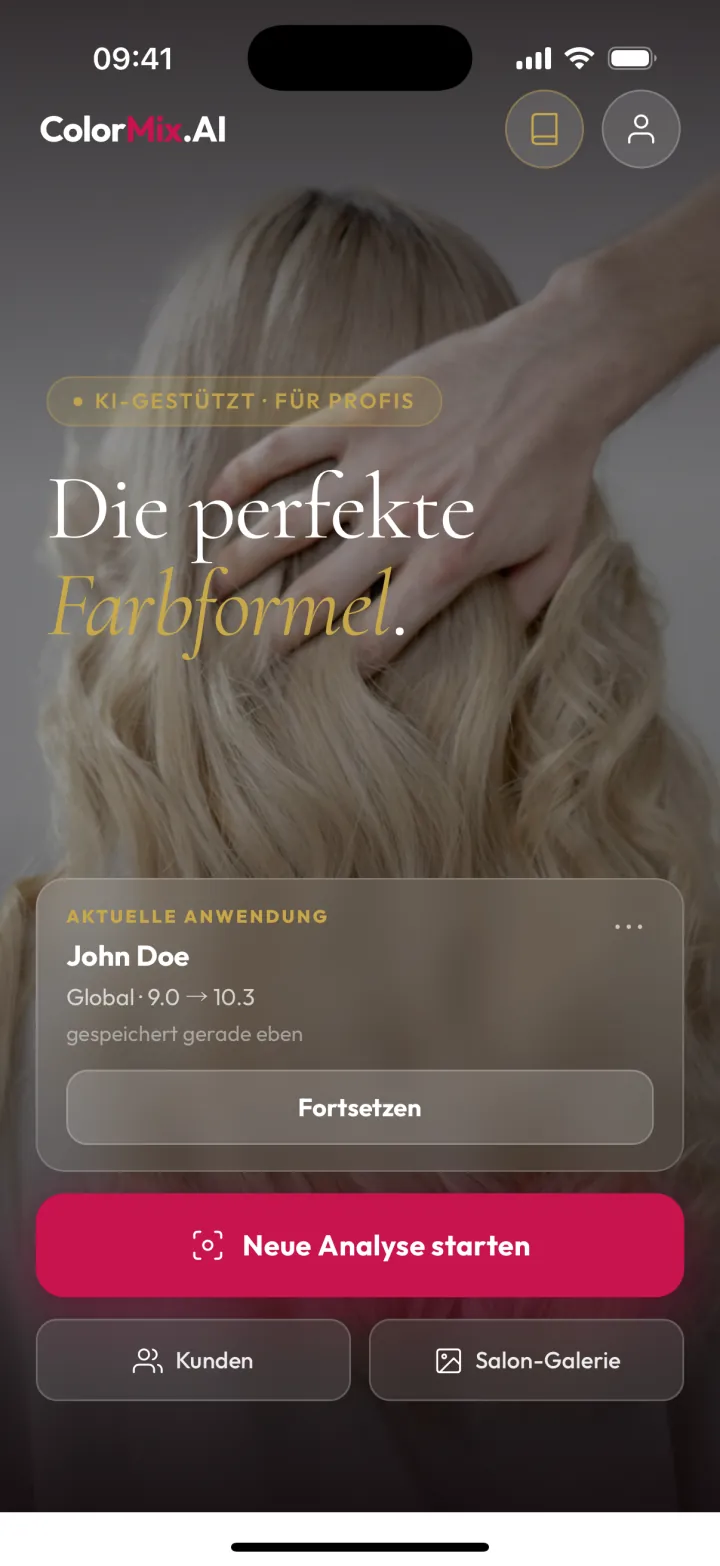
  1. 01Start

    Straight into the salon workflow

    After logging in you land on the start screen. From here you start a new analysis, open your client records or continue an ongoing application.

    • New analysis with one tap
    • Clients, salon gallery and My account within reach
    • Current application stays on the start screen to continue
    ColorMix.AI start screen with the current application of the demo client John Doe, the “Start new analysis” button, Clients and Salon gallery
  2. 02Client

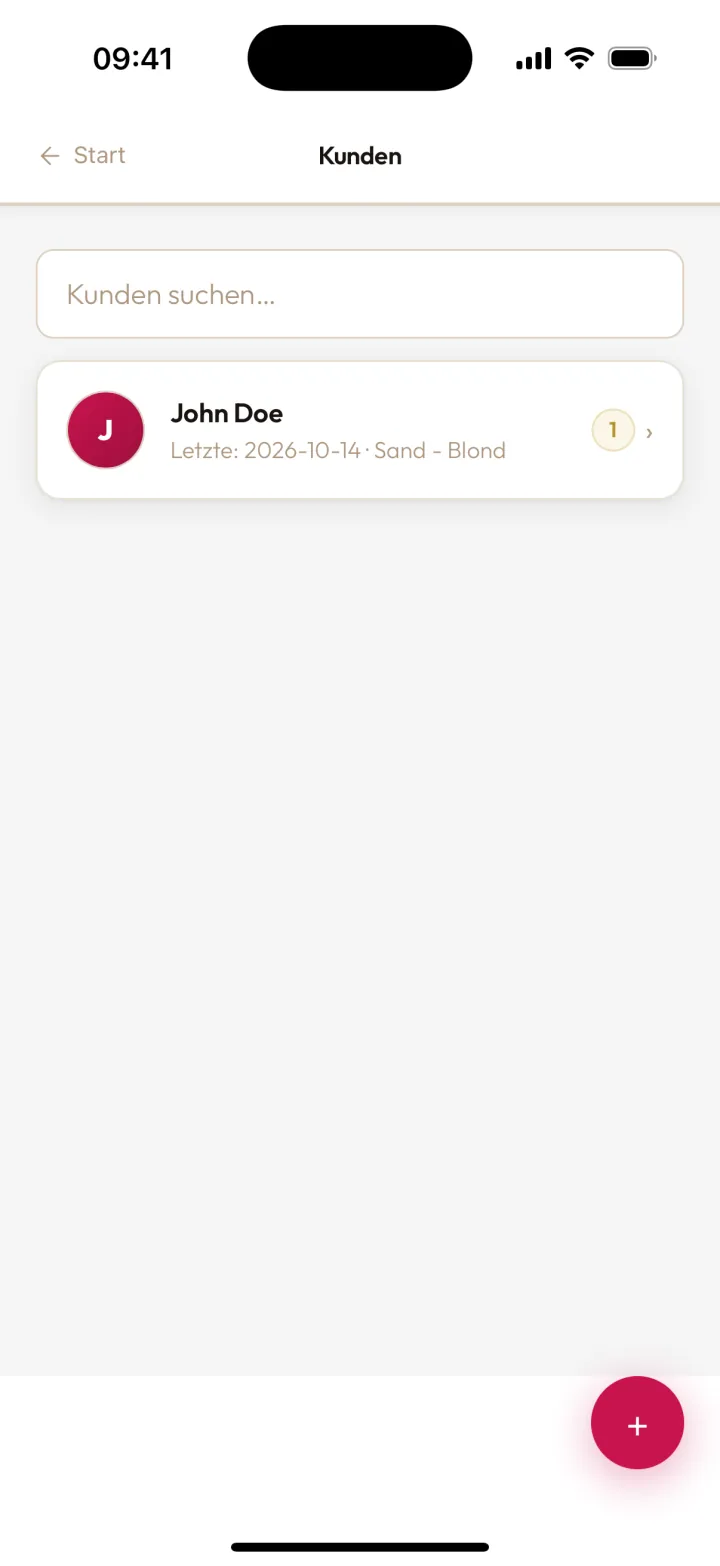
    Select or create a client

    Every analysis belongs to a client profile, so it stays traceable. Pick from the client list, create a new profile in seconds or start without assigning one.

    • Client list with search and last treatment
    • New client profile with current hair condition: natural, coloured or bleached
    • Quick start without a client
    Client list with the demo client John Doe and his last treatment
  3. 03Capture

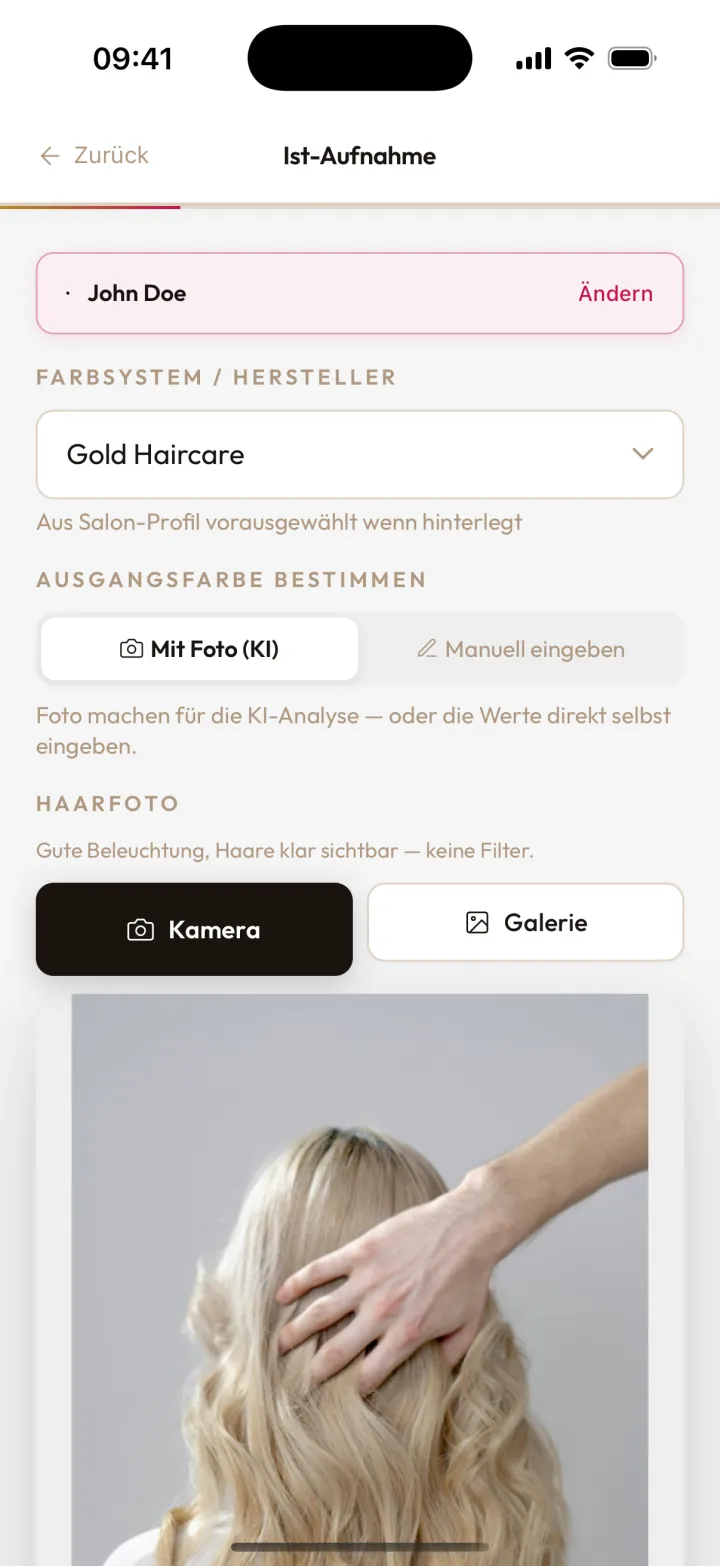
    Capture the starting point

    Choose the colour system and take a photo of the current hair colour. Alternatively, enter the starting values yourself.

    • Photo via camera or from the gallery
    • Automatic check whether the photo is suitable for analysis
    • AI photo analysis with Pro and in the 5 free analyses
    “Current capture” screen for John Doe with colour system Gold Haircare, photo analysis selected and a back-view hair photo
  4. 04Analysis

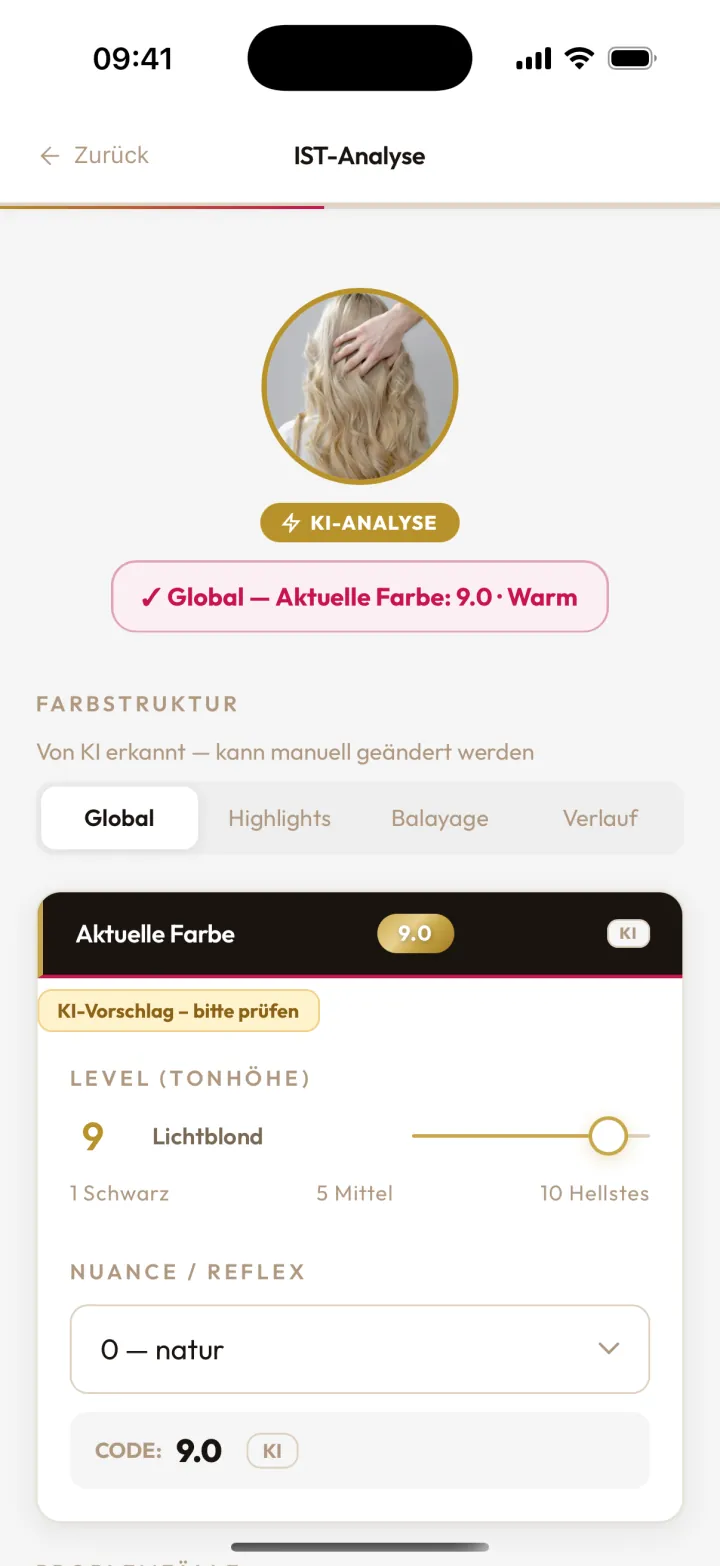
    AI support for the starting colour

    ColorMix.AI suggests the colour structure – global, highlights, balayage or ombré – plus depth and tone. You review the suggestion and correct it with one tap if needed.

    • Structure, depth and tone as a suggestion
    • Add grey share and problem cases
    • Every value stays editable by you
    “Current analysis” screen with the AI suggestion global, level 9, natural tone and the note “AI suggestion – please check”
  5. 05Inspiration / Target look

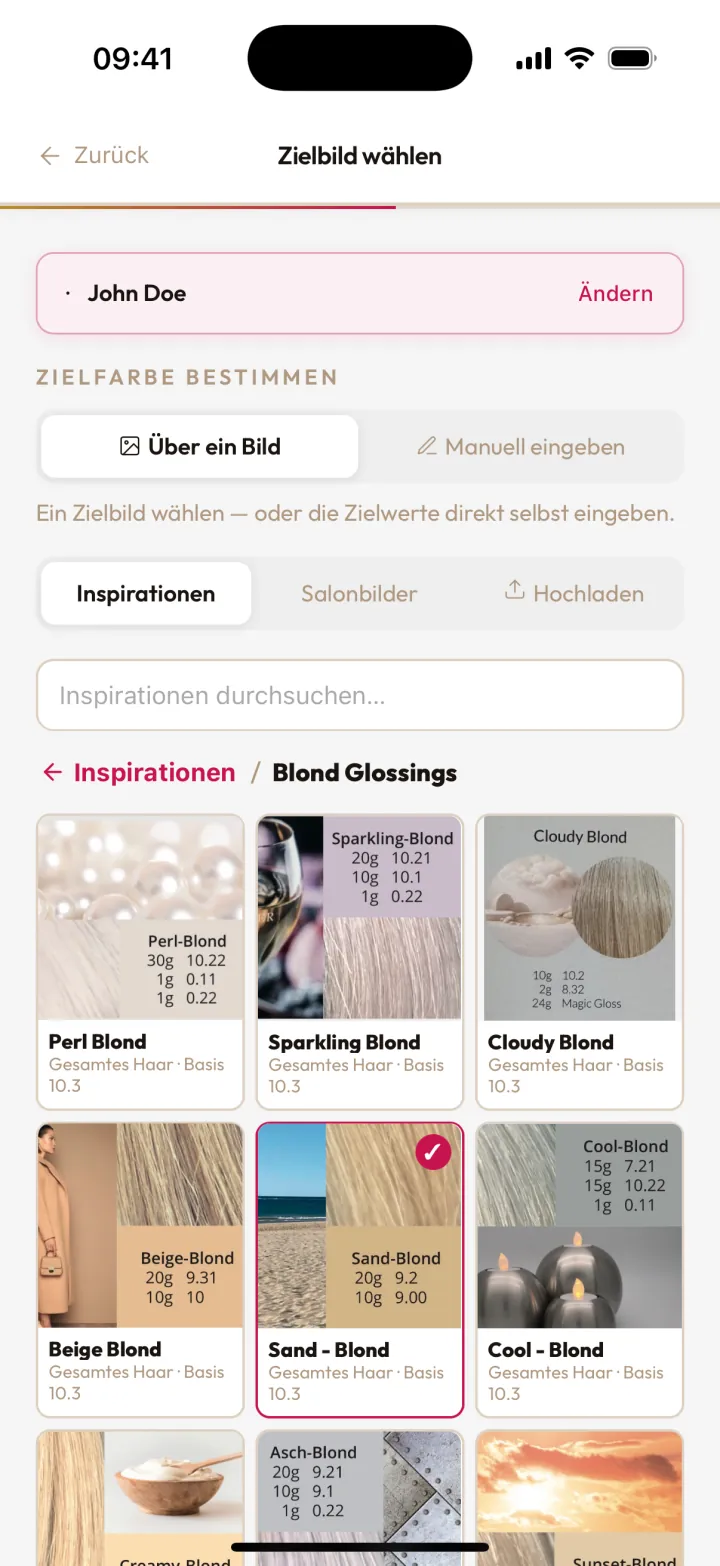
    Choose the desired result

    Choose the target from an image – from the inspirations, your own salon photos or an upload – or enter the target values manually. In the demo: Blond Glossings, Sand Blond.

    • Inspirations sorted by colour family
    • Your own salon photos with Pro
    • Manual entry at any time
    “Choose target image” screen with the Blond Glossings inspirations and the selected inspiration Sand Blond
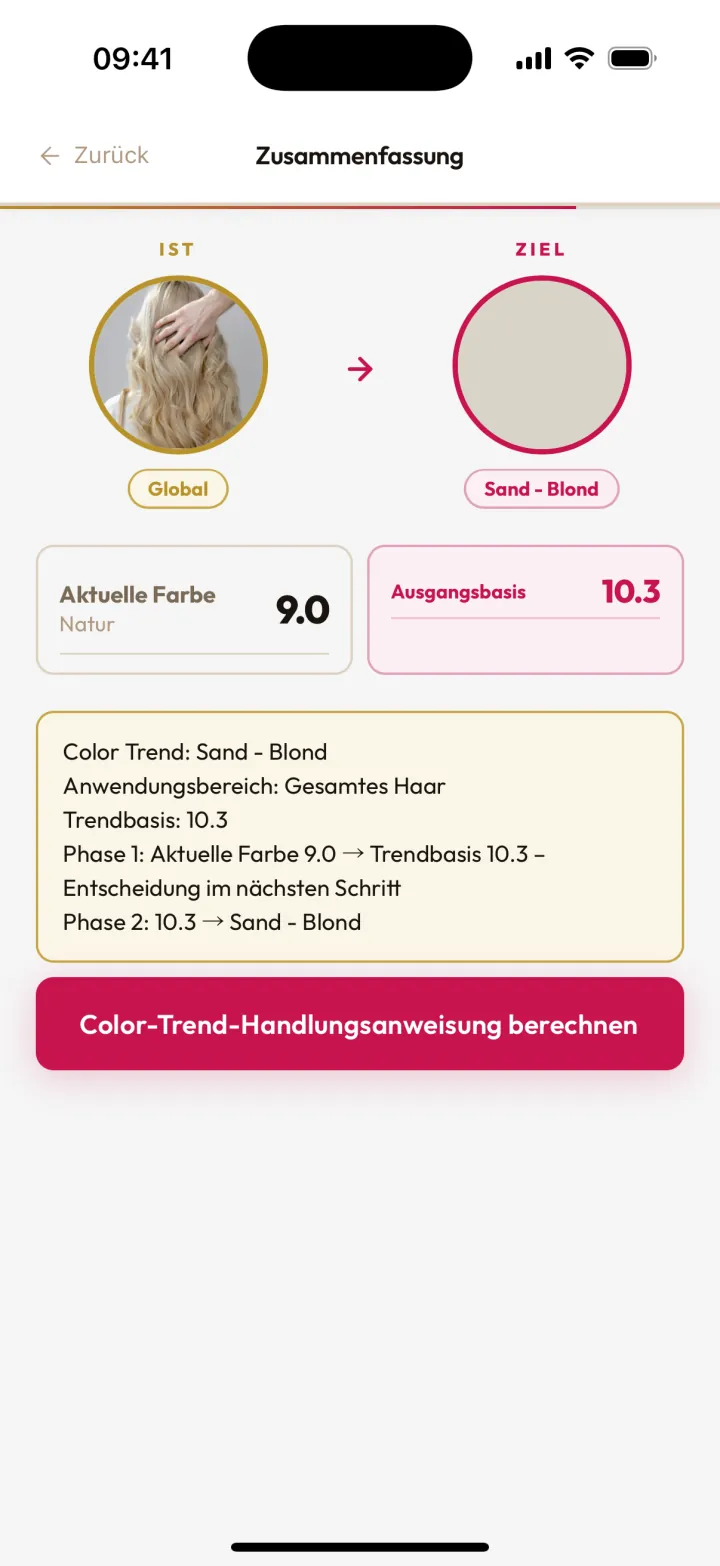
  6. 06Summary

    Starting colour and target at a glance

    The summary puts current and target side by side and shows the way in phases: first reach the starting base, then apply the target.

    • Current and target side by side
    • The way in phases: base first, then target
    • One tap to the application steps
    “Summary” screen with current global 9.0, target Sand Blond with starting base 10.3 and the two phases
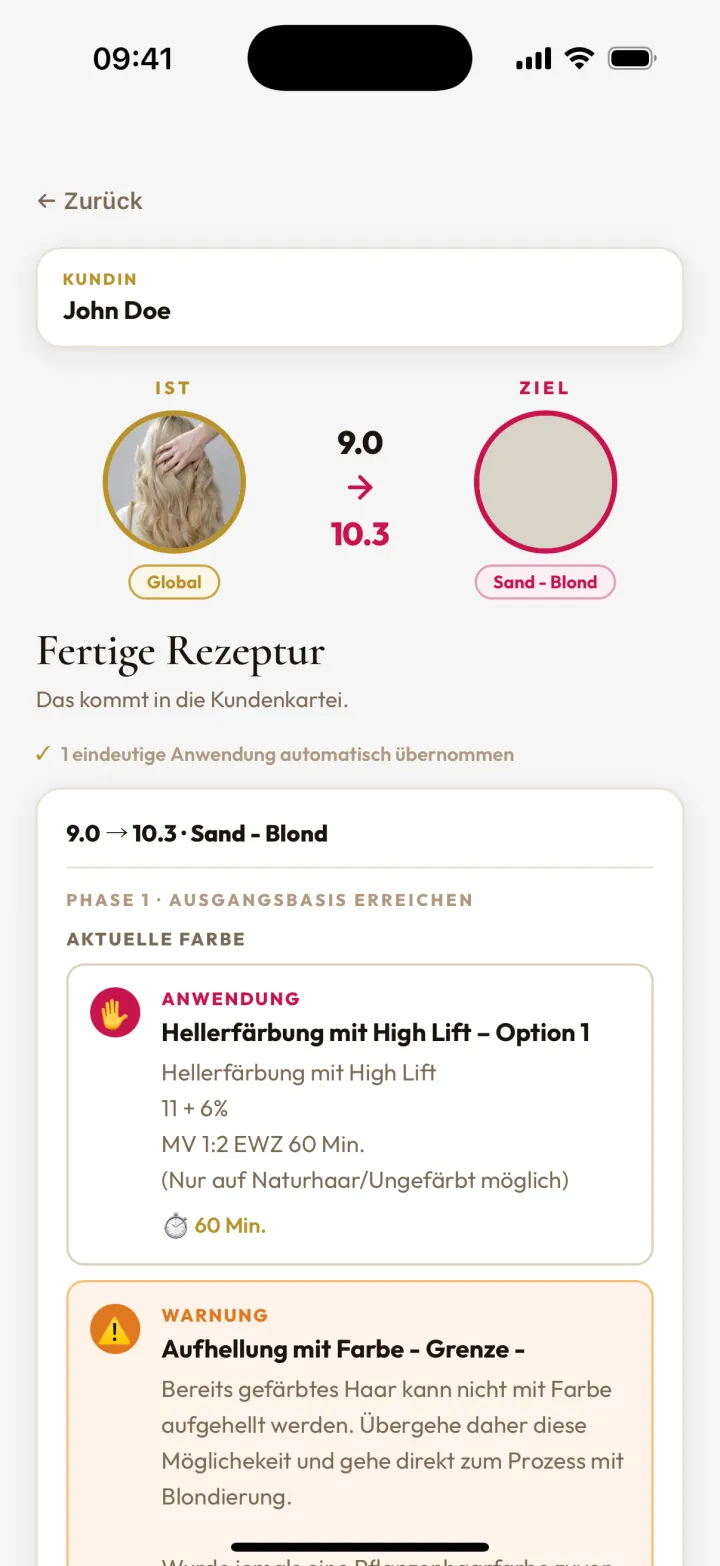
  7. 07Formula / Recipe

    You decide, the formula is ready

    The formula assistant guides you through the decisions. Where several ways are stored, you choose the application. The finished formula follows the stored GOLD rule – the professional decision stays with you.

    • Choose the application from the stored ways
    • Amounts, mixing ratio and processing time
    • Warnings and notes right in the formula
    “Finished formula” screen for John Doe with phase 1 high-lift lightening, processing time and a warning
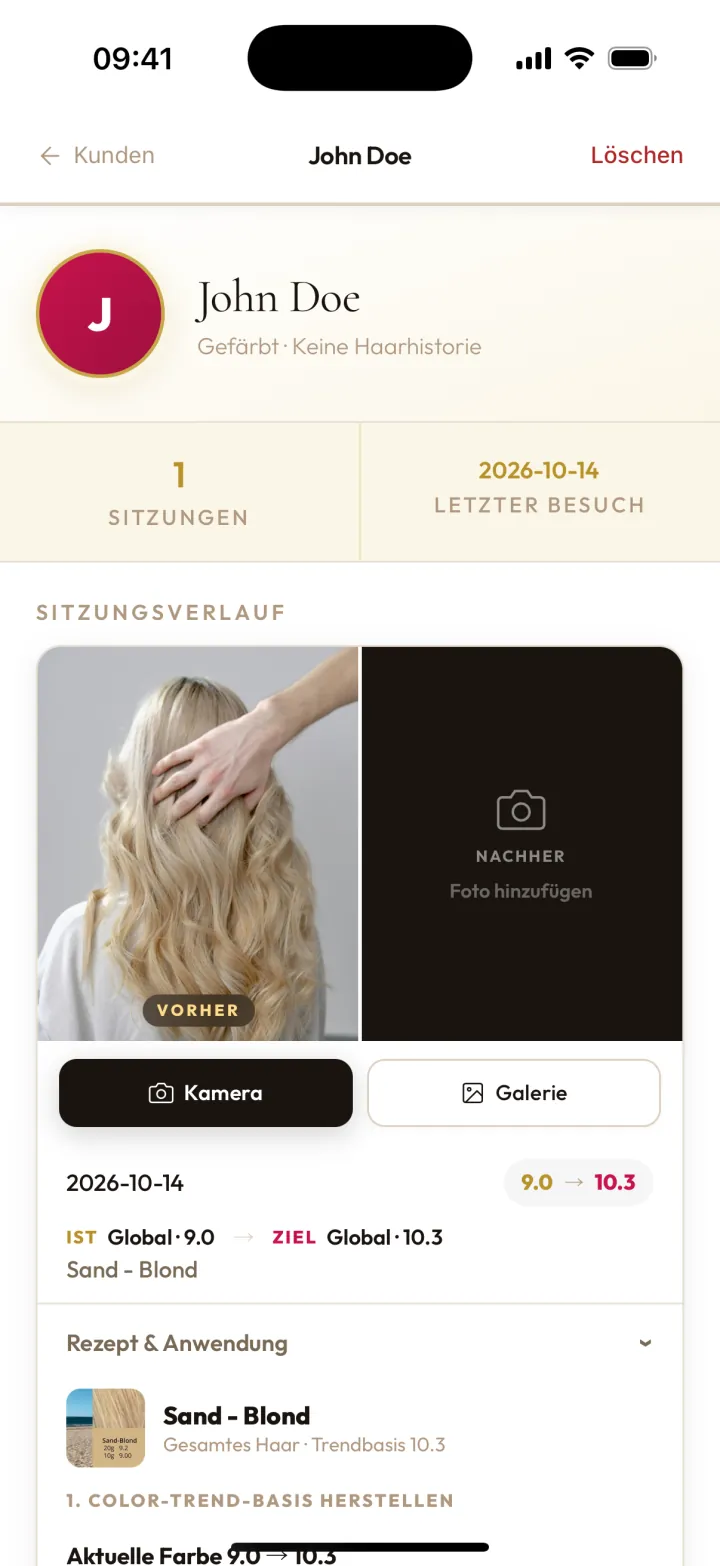
  8. 08Client history

    Saved to the client history

    Save the treatment to the client record with one tap. At the next appointment you see what was done last time – with current, target and formula.

    • Treatment history with current, target and formula
    • Before and after photo
    • Continue the current application from the start screen
    Client record of John Doe with one session, before photo, current 9.0 and target 10.3 Sand Blond

What ColorMix.AI brings to your salon

  • AI-supported photo analysis of the starting colourPro
  • Structure detection: global, highlights, balayage, ombréPro
  • Depth and tone per area
  • Target from inspirations, salon photos or manual entry
  • Formula assistant based on GOLD rules
  • Client records with treatment history
  • Salon gallery with your own photosPro
  • Education area in the app
  • Basic 2 · Pro 3 · Team 10 devices
  • 5 free analyses to start

Screenshots and recording from the current iOS app with a demo salon and the fictional client John Doe. The app interface is in German. ColorMix.AI is an assistance system – the professional decision stays with you.

Voices from the salon

What hairdressers say

★★★★★
The AI reads undertones almost better than I do – and I've been doing this for 15 years.”
J
Julia R.Senior Colorist, Vienna
★★★★★
“I save at least 5 minutes per client. With 8 clients a day, that makes a huge difference.”
S
Sandra K.Master Hairdresser, Munich
★★★★★
“Finally, no more paper chaos! Everyone in the salon can see the latest formula and pick up right where we left off.”
L
Laura M.Salon Owner, Hamburg
FAQ

Frequently asked questions

The key answers about plans, data and getting started.

Do I need to install an app?
Yes. ColorMix.AI is a native app for iPhone and Android.
What happens after the 5 free analyses?
You choose a plan: Basic for €49 a month (manual selection) or Pro for €69 a month (with AI photo analysis). Paying yearly costs €490 or €690 and saves you two months. You can also redeem a voucher.
What's the difference between Basic and Pro?
Basic includes the complete rule set: you choose the current and target color yourself, or pick an inspiration, and get the formula and application. Pro adds AI photo analysis for current and target color, your own salon photos with the AI-powered salon gallery, plus faster support.
Which brands are included?
Currently GOLD Professional only. Wella, L'Oréal, Schwarzkopf and Redken are in preparation.
Is my client data secure?
Yes. All data is stored encrypted on EU servers, in line with the GDPR. No salon can see another salon's data.
Can I switch plans?
Yes. For now, our support team switches an active subscription from Basic to Pro. Your client data stays intact. Monthly plans can be cancelled anytime, yearly plans at the end of the term.
Ready?

Your next formula
is one photo away.

Start with 5 free AI analyses and see for yourself how fast ColorMix.AI works at the chair.

How it works